How Fast Should You Reply to a Quote Request?
A quote request lands while you're on site: how to reply fast without dropping everything, realistic response times by request type, and the messages to set up.
 Julien DevoirCo-founder, Product & Systems
On this page
10:12am. You're up a ladder, hands full. Your phone buzzes: a new quote request from your website. You'll call them tonight. At 7pm, you finally ring. The customer politely tells you they've already booked someone else, for tomorrow morning.
The other company wasn't better. They just answered first.
The good news: replying fast doesn't mean dropping everything every time your phone rings. You just need to separate two different kinds of reply, and set up the first one in advance.
What the customer does while they wait
When someone asks for a quote, they're rarely sitting by the phone waiting for you. Usually:
- They contact other companies. A website form, a couple of calls, a request on a lead platform. They want to compare, and they want to move.
- They book whoever answers first. Not out of preference. Simply because it's done, and they have other things to deal with.
- Their interest fades. The day they ask, the project is top of mind. Three days later, other things have taken over.
- They form an opinion of you. A company that replies quickly looks like a company that will be responsive on the job too.
Response time isn't just good manners. It's often the first thing customers judge you on, before price.
Two replies you shouldn't mix up
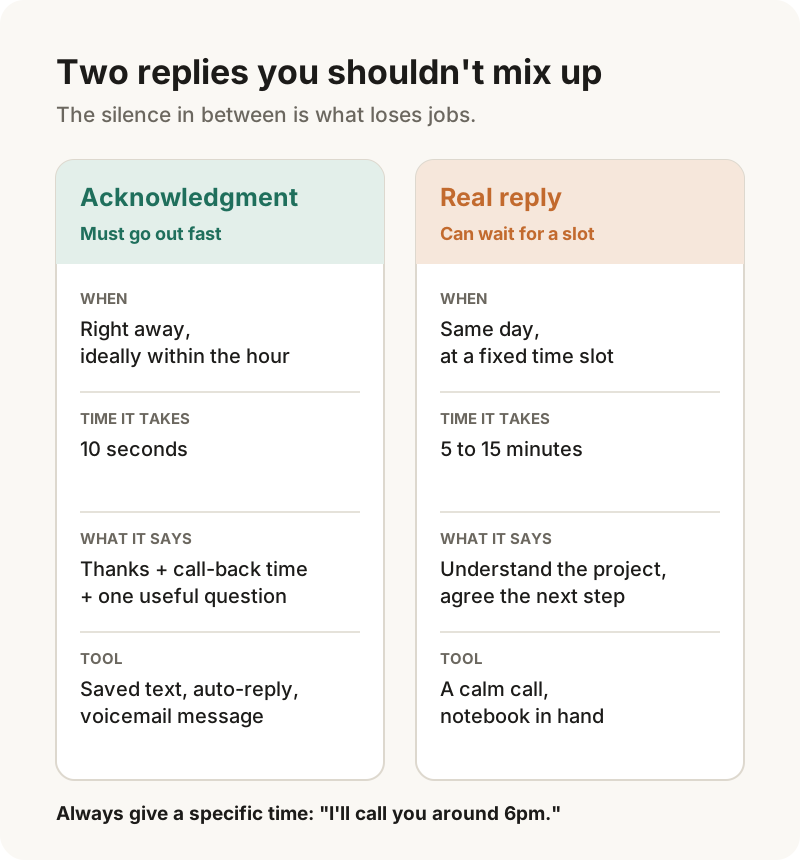
"Reply fast" usually blurs two different things.
The acknowledgment. The message that tells the customer: "Got your request, I'll call you back at this time." It takes ten seconds. It can even be automatic for requests that come in by email or web form. This is the one that needs to go out fast.
The real reply. The call where you understand the project, ask your questions and agree the next step (a visit, a meeting, a quote). It takes time and attention. It can wait a few hours, as long as the customer knows when it's coming.
Waiting a few hours for the real reply isn't what loses jobs. Leaving the customer with no news at all in the meantime is.
Realistic response times by request type
Not every request needs the same speed. Here are practical benchmarks to adjust to your trade:
| Request type | Acknowledgment | First real conversation |
|---|---|---|
| Emergency, repair call-out | Right away | Within the hour |
| Small job, simple work | Within the hour | Same day |
| Bigger project (renovation, kitchen, installation) | Within the hour | Same day, or next morning |
| Request in the evening or on the weekend | Automatic reply | Next working day, before noon |
For the quote itself, there's no ideal turnaround: it depends on how complex the job is. The rule is different: give a date, and stick to it. "You'll have the quote on Thursday" beats a fast quote dashed off whenever you happen to have a free evening.
Replying fast when you're on site all day
You can't pick up every five minutes, and nobody expects you to. The goal is never to leave a request without news for more than a few hours. A simple routine is enough.
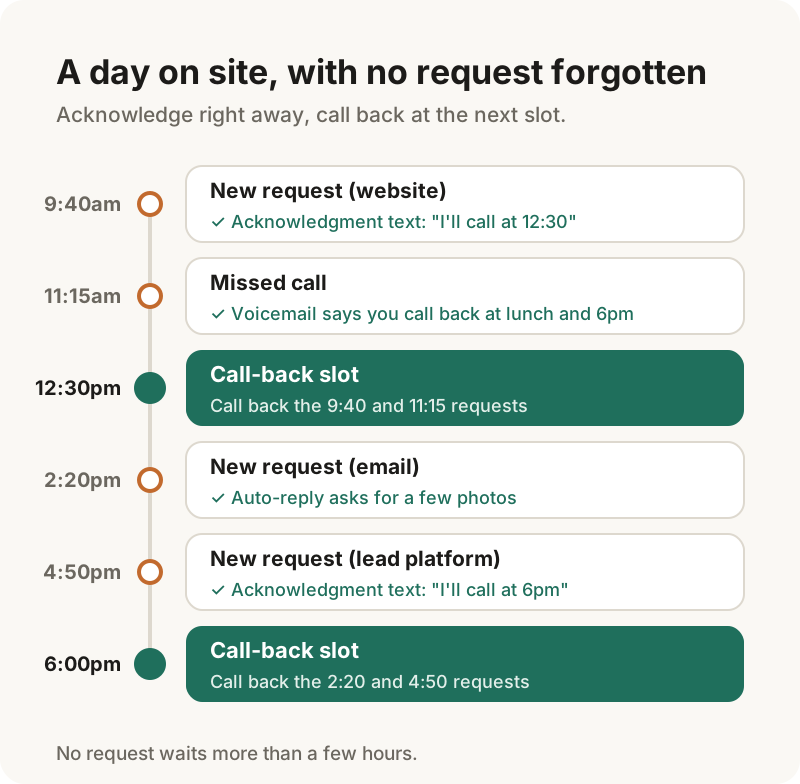
1. Two fixed call-back slots a day. For example at lunch and at the end of the day. Requests from the morning get handled at lunch, afternoon ones at the end of the day. You call back calmly, with a notebook to hand.
2. An acknowledgment ready to send. Save it in your phone's text replacements or quick replies, or in a note. When a request comes in, you send it in ten seconds, even from the site.
3. A voicemail message that works for you. Your voicemail can tell the customer when you call back. It's often their first contact with your business.
4. An auto-reply for emails and your website form. It confirms receipt, says when you'll call, and can ask for a few photos.
5. Someone to relay, if you have them. A partner, a business partner, a part-time admin: same routine, same messages. What matters is that every request gets a reply, and everyone knows who's calling back.
From the handbook: Make inquiries easier: voicemail greeting, missed calls and the five questions your inquiry form needs.
The messages to set up today
Three messages cover almost every situation. Set them up once, and you won't have to think about it again.
The acknowledgment text
Hi [First name], thanks for your request. I'm on a job right now, I'll call you back today around [12:30 / 6pm]. If you can send me 2 or 3 photos of [the room / the current setup] before then, that would be perfect. [Your name], [Company]
The email or web form auto-reply
Subject: We've received your request
Hi,
Thanks for your quote request. We've received it, and we'll call you back [today / the next working day before noon].
To help us prepare, you can reply to this email with:
- a few photos of [the current setup / the area concerned];
- when you'd ideally like the work done.
Speak soon, [Signature]
The voicemail message
"Hi, you've reached [Your name] at [Company]. I'm on a job right now. Leave your name and what it's about: I call back every day at lunchtime and at the end of the day. Thanks!"
These messages have one thing in common: they give a specific time. "I'll call you back soon" reassures nobody. "I'll call you around 6pm" lets the customer wait without shopping around.
The first call: what really matters
When you call back, you don't need to know everything. You need to understand the project well enough to decide what happens next. Three things are enough for this first conversation:
- The project in one sentence, in the customer's own words.
- The timing: when do they want the work done?
- The next step, agreed before you hang up: a visit, a meeting, some photos, or the date of the quote.
The more detailed questions (budget, who decides, technical constraints) can come during this call or at the visit. What matters is that the customer hangs up knowing what happens next.
Measure your response time for one week
Think you reply fast? Check. For one week, log every request you receive in a simple table.
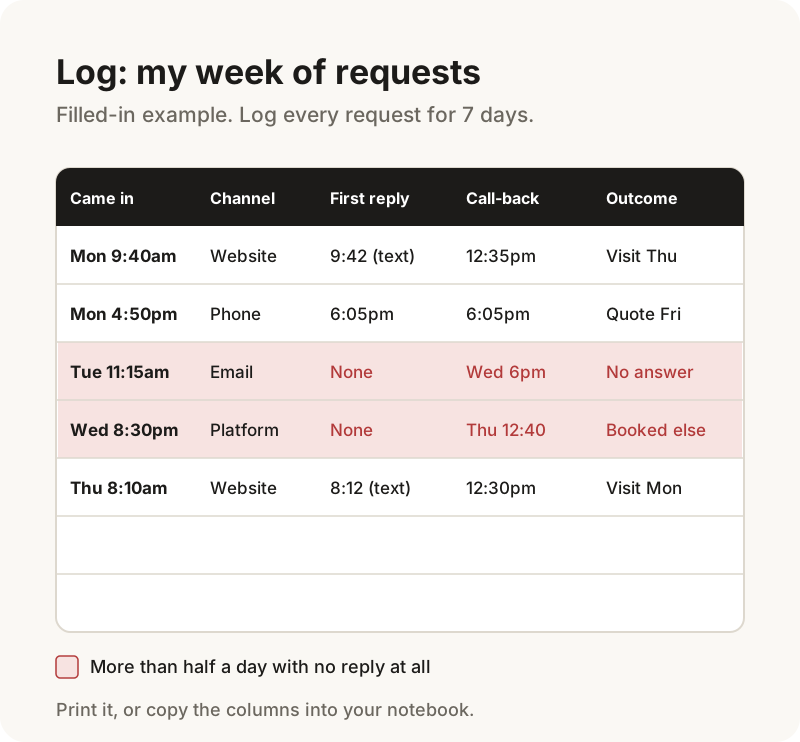
For each request, note:
- the day and time it came in;
- the channel (phone, website, email, platform);
- the time of your first reply, even a quick text;
- the time of the real first conversation;
- the outcome: visit, quote, declined, no answer.
At the end of the week, look at three things. How many requests went more than half a day with no reply at all? Which ones came through a channel you rarely check? And did the requests you answered quickly turn into visits more often?
This small log tells you exactly where to act, without needing any industry benchmark.
Key points
- Customers don't expect a complete answer right away. They want to know their request was seen, and when they'll hear back.
- Separate the acknowledgment, which must go out fast, from the real reply, which can wait for a fixed slot.
- Set up three messages (text, auto-reply, voicemail) with a specific call-back time.
Frequently asked questions
How quickly should you respond to a quote request?
Send an acknowledgment as fast as you can, ideally within the hour, saying when you'll call back. The real first conversation can then happen the same day. For the quote itself, what matters is giving a date and sticking to it.
Do you need to reply to quote requests in the evening or at weekends?
Not necessarily. An automatic reply or a short text saying when you'll call back is usually enough. Customers don't expect you to be available around the clock: they want to know their request was seen and when they'll hear from you.
What should an acknowledgment for a quote request say?
A thank-you, the exact time you'll call back, and one or two useful questions to prepare the call, such as a few photos or their preferred timing. Keep it short: you should be able to send it in ten seconds from a job site.
Read next: Client Not Responding After a Quote? What to Do Next